
The Shopware B2B Suite has been replaced by the B2B Components. Shopware no longer develops the Suite, support ends with Shopware 6.8, and its migration tool moves employees, roles, budgets, quotes and shopping lists for you. Pricing and your ERP integration are the parts you plan by hand. This guide shows what replaces each Suite feature, what Shopware’s migration tool moves for you, and what your ERP integration has to change.
 B2B SuitetoB2B Components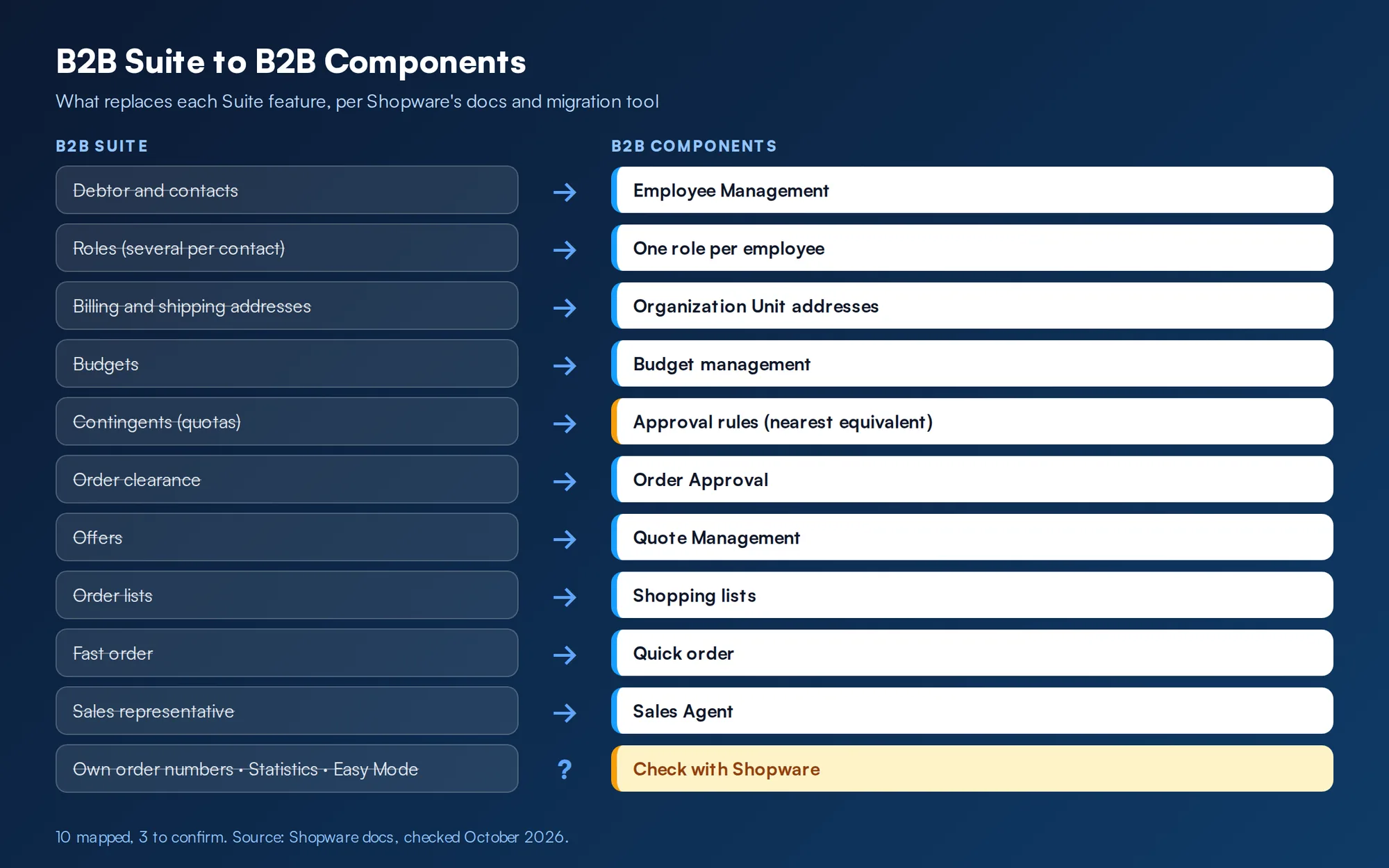
Quick summary
Running the B2B Suite today? Talk to us about your migration and we will map what moves, what changes and what your ERP needs.
Web Solutions NYC builds B2B commerce on Shopware and Adobe Commerce, almost always wired to an ERP such as NetSuite, Epicor P21, Dynamics, SAP Business One, Sage or Acumatica. We are a Shopware Platinum partner. On every build the ERP stays the source of truth for price, stock and credit, and the store reads from it.
What is the Shopware B2B Suite?
The B2B Suite is Shopware’s original B2B extension. Shopware’s English user docs describe it as giving a store “the most important B2B functions”, including budgets and quotas, order lists and quick orders. From the buyer’s side, the Suite let an authorized company account map its own organization:
In the admin, a customer is assigned one of two B2B roles: debtor, the company’s central account, or sales representative, a merchant employee who can log into assigned debtor accounts and order for them. A debtor can also run in Easy Mode, a simplified view with no role management and no budgets or quotas.
What are Shopware B2B Components?
The B2B Components are the modular replacement. Shopware announced them in mid-2023, and its February 2024 post calls them a “viable and tested alternative to the B2B Suite”. They are part of Shopware 6 and work with the Flow Builder and Rule Builder. The developer docs list:
Digital Sales Composables add frontends for sales rep work. The user docs also cover Budget management (from Shopware 6.7.4.0) and advanced product catalogues per organization unit. Each component can be switched on or off per customer, per customer group at registration, or globally for new business customers. For how these fit a wider portal project, see our guide to B2B customer portal software.
“We have a company that would order from us and they have about six different people within that same company that would order from us, would it show which company they ordered from?”
A buyer on a sales call: web project manager, safety equipment seller
With Employee Management, yes: each employee orders under the company account, and the order shows who placed it.
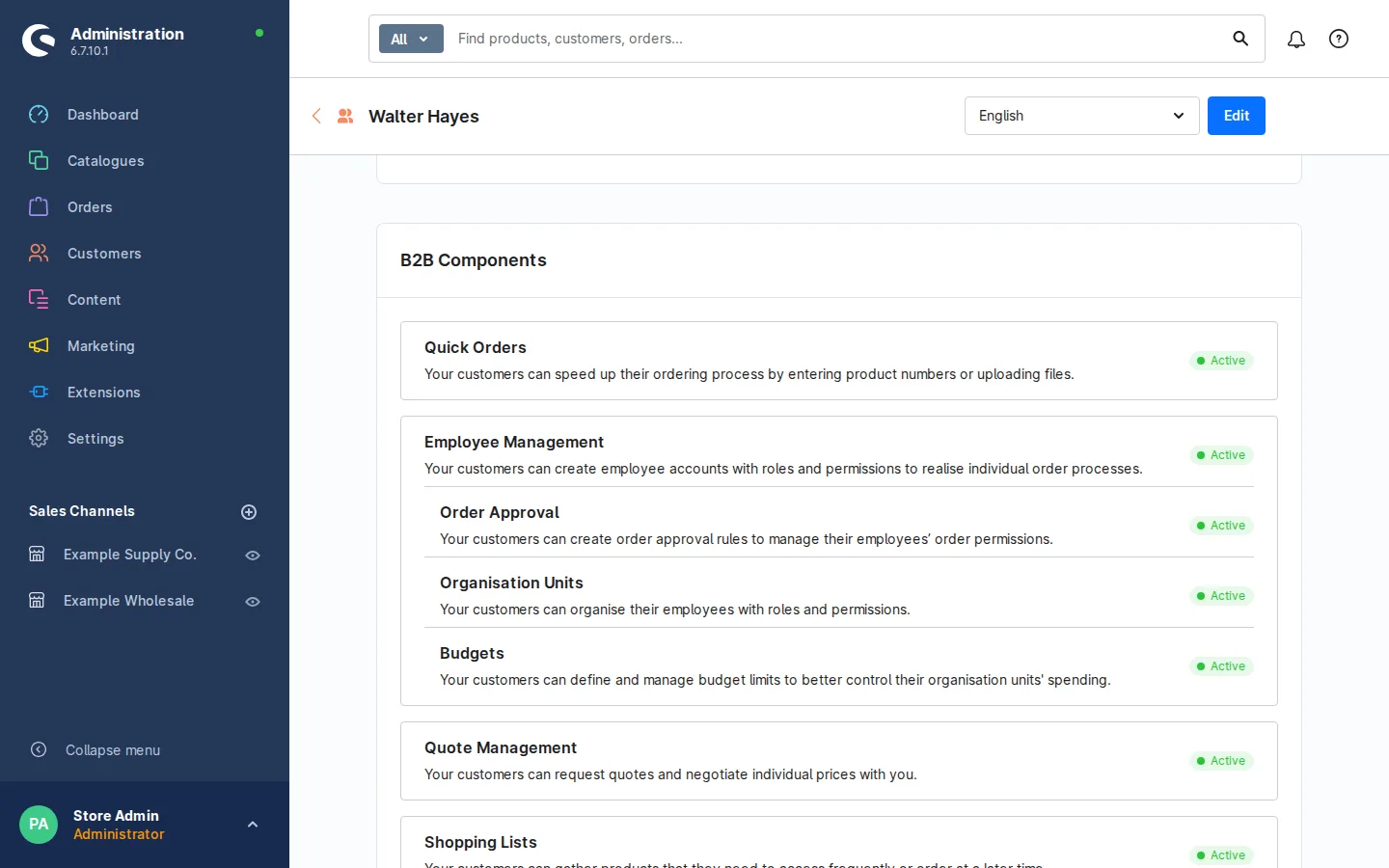
B2B Suite vs B2B Components: feature mapping
This table only maps what Shopware’s docs or its migration tool support. Where we could not find a stated equivalent, we say so.
| B2B Suite | B2B Components | Basis, or how we handle it |
|---|---|---|
| Debtor account, contacts | Employee Management | Migration maps contact permissions to employee permissions |
| Roles (several per contact) | Roles (one per employee) | Migration merges several Suite roles into one role |
| Billing and shipping addresses | Organization Unit addresses | Address permissions map to organization unit permissions |
| Budgets | Budget management | Migrated by the tool; needs B2B Commercial 7.6.0+ |
| Contingents (quotas) | Budgets plus approval rules (nearest equivalent) | We rebuild quotas as budgets per organization unit, and per-order limits as approval rules |
| Order clearance | Order Approval | Approval rules and pending order permissions |
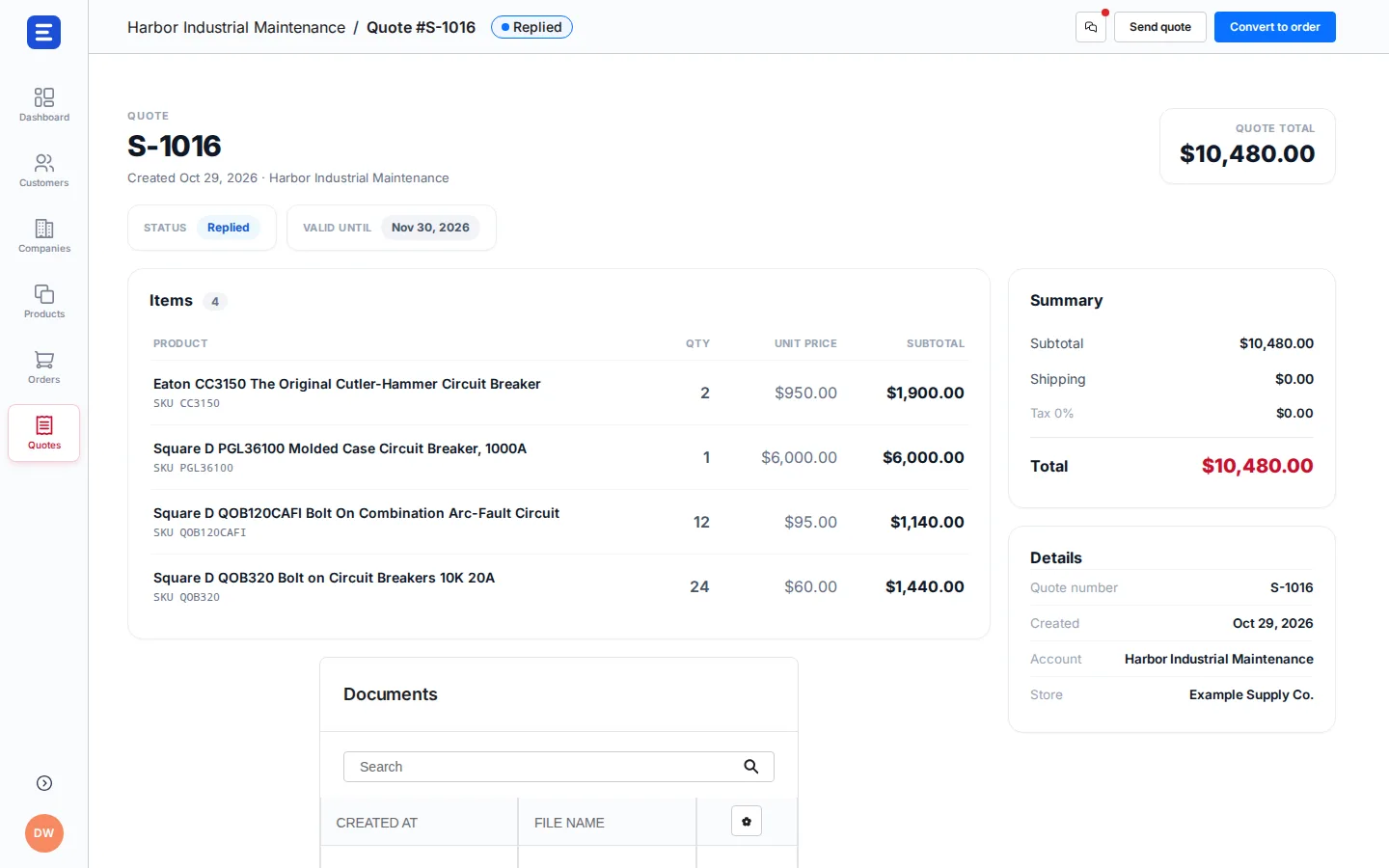
| Offers | Quote Management | Offer permissions map to quote permissions |
| Order lists | Shopping lists | Shopping List is a migrated component |
| Fast order | Quick order | Both add products by number or file upload |
| Sales representative | Sales Agent | Separate frontend app, from Evolve |
| Own order numbers | No separate component | We add a PO number field at checkout and pass it to the ERP |
| Statistics | No separate component | Buyers keep their order history; account reporting usually comes from the ERP or a rep dashboard on Sales Agent |
| Easy Mode | No equivalent mode | Switch on only the components that customer needs |
Shopware’s own role mapping reference says it plainly: some Suite permissions do not exist in the Components, so they are mapped to the nearest equivalent.
“If I have a customer that wants somebody to approve orders that people underneath them are making, do you have that ability?”
A buyer on a sales call: owner, commercial print and fulfillment company
In the Components, that is Order Approval: the buyer sets a rule, such as orders over a set amount, and a named approver signs off before the order reaches you.
Who must migrate, and by when
- The B2B Suite is no longer being developed.
- It will no longer be supported starting with Shopware 6.8.
- Evolve plans bought from May 24, 2025 get only the B2B Components. The Suite installation guide applies only to Evolve plans bought by May 23, 2025.
Shopware gives no calendar date for 6.8 on the pages we checked. Do not let the 6.8 upgrade be the day you find out what the Suite was doing.
“We’re changing platforms, we had some problems with the other platform we were on, and it just didn’t work out for us… We’re just in a transition mode at the moment.”
A buyer on a sales call: owner, multi-category online retailer
A Suite migration is smaller than a replatform, but it deserves the same plan.

How to migrate from the B2B Suite to B2B Components
Shopware provides a B2B Suite Migration extension. It runs in the message queue, moves components in order (employees before budgets and quotes), and logs every record in three tables: migration state, a map of old to new records, and errors.
“I always say this is one of the most painful things you’ll ever do. It’s not fun… We know it’s not easy. We definitely don’t want you managing it in two systems.”
Yitz Lieblich, founder, Web Solutions NYC
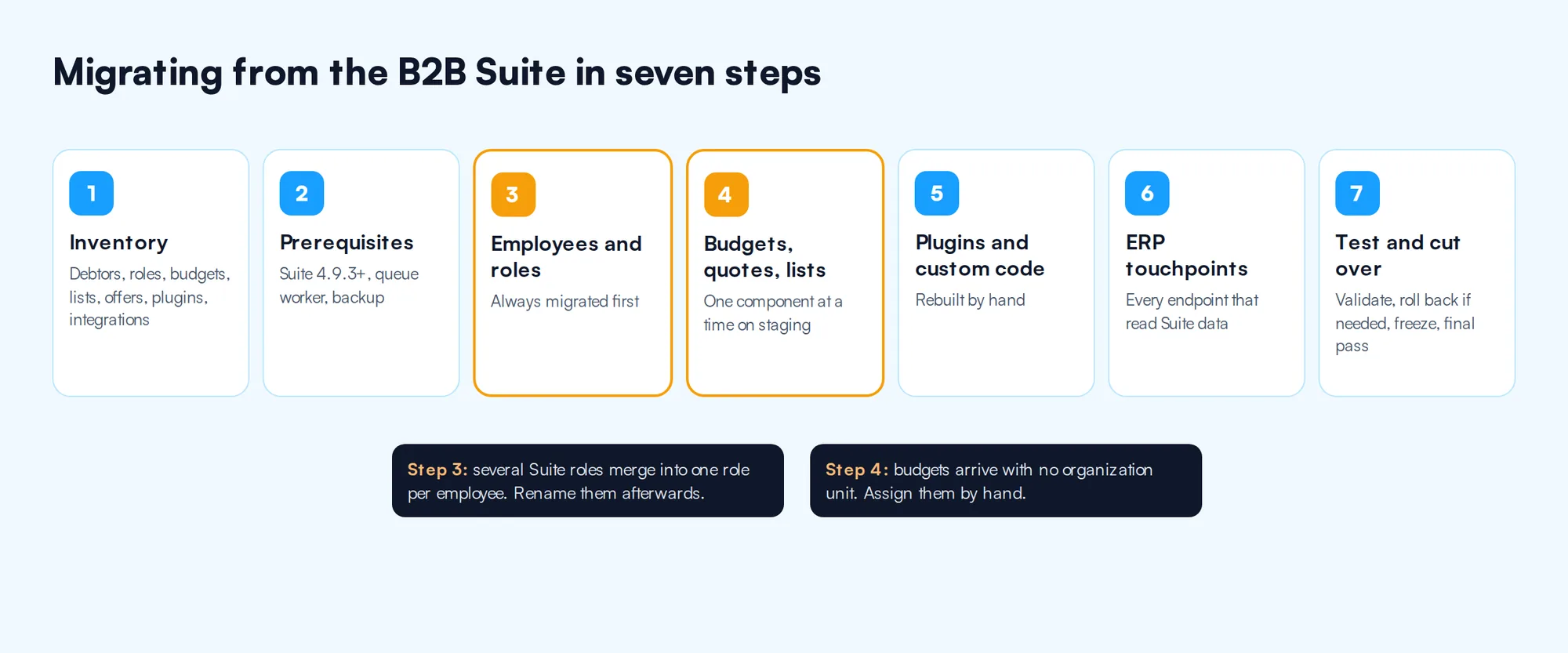
Inventory what the Suite does today
List every debtor, role, contact, budget, contingent, order list and open offer. Then list every plugin, theme override and integration that reads Suite tables or routes. The migration tool moves data. It does not rewrite custom code.
Check the prerequisites
- B2B Suite version 4.9.3 or above.
- A running message queue worker.
- B2B Commercial 7.6.0 or above if you migrate budgets.
- A database backup if B2B Commercial already holds data. The migration adds data to the Components and does not remove Suite data.
Migrate customers, contacts and roles
Employee management is always migrated first. Watch the roles: in the Suite an employee can hold several roles plus individual permissions, while in the Components each employee has one role. The tool merges them and names the new role by joining the old names with underscores, plus the email address when individual permissions were present. Rename them afterwards; the permissions stay the same.
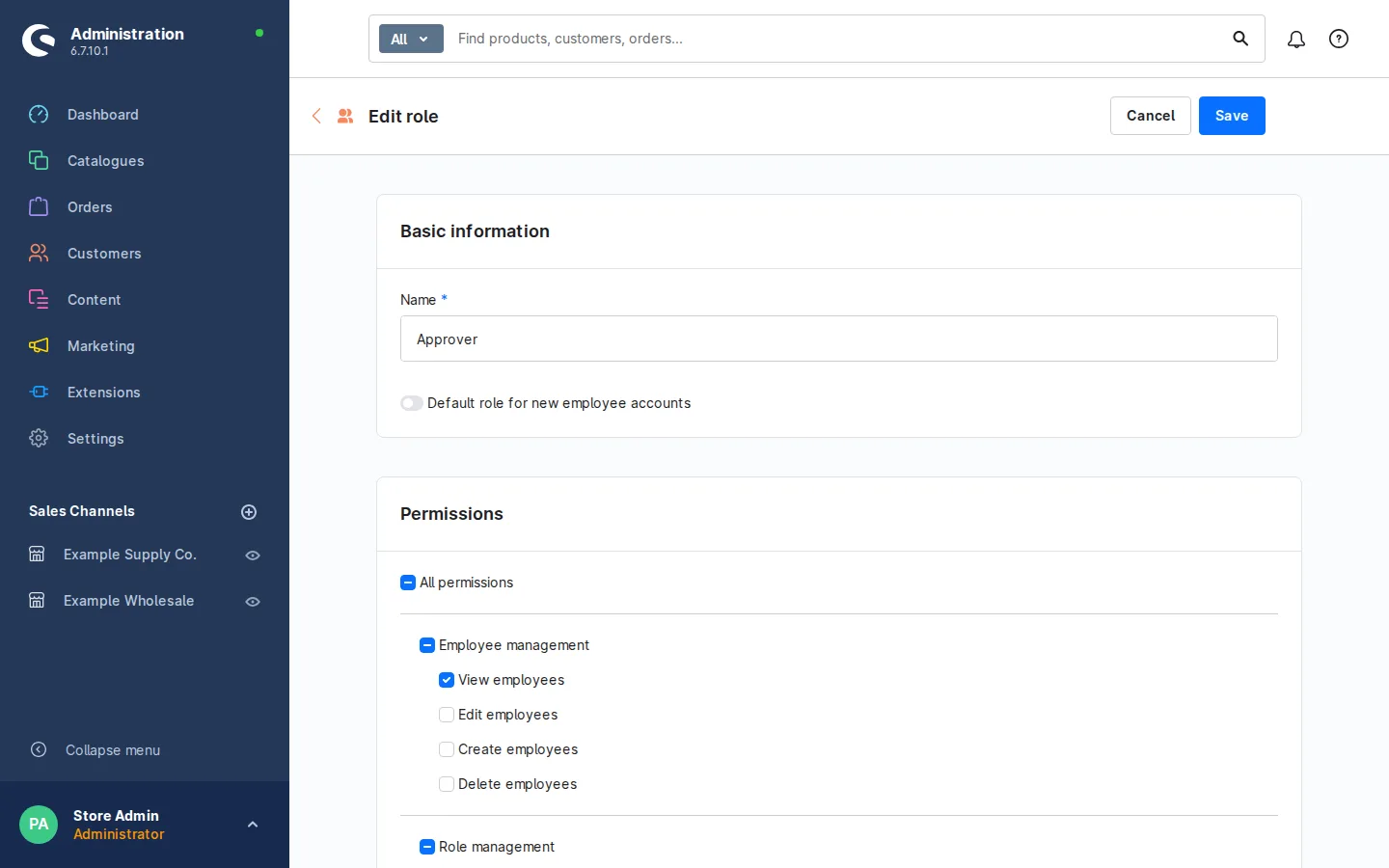
In the Components, each employee holds one role with its own permission set. Screenshot from our Shopware demo store. Example data, not a client account. Migrate budgets, quotes and lists
Run selected components on staging, for example
bin/console b2b:migrate:commercial quote_management shopping_list(employee management still runs first), and watch progress withbin/console b2b:migrate:progress --watch. One known gap: each migrated budget arrives with an empty organization unit, and you must assign it by hand.
A budget with its organization unit set. After migration you set this field by hand. Screenshot from our Shopware demo store. Example data, not a client account. Review plugins and custom code
Anything built on the Suite needs a new home. Shopware’s docs show how to toggle a custom B2B feature per customer, check it in routes and in Twig, and extend the migration with your own fields and entities through XML configuration.
Rework ERP touchpoints
Map every place your ERP integration reads or writes Suite data: company accounts, contacts, addresses, offers, approvals. Each endpoint changes, and this is usually the largest line in the project. Our ERP integration guide covers the full list of what syncs, and Shopware integrations for ERP, PIM and OMS covers the Shopware side.
Test, then cut over
Validate the configuration with
bin/console b2b:migrate:validate. If a batch fails, every record in it is marked as an error and logged.bin/console b2b:migrate:rollbackremoves migrated data and leaves the Suite data intact, so you can rerun. At cutover, watch for the “Has new records” status, which means buyers changed Suite data during the run. Freeze B2B account changes, run a final pass, and switch.
Which plan includes what
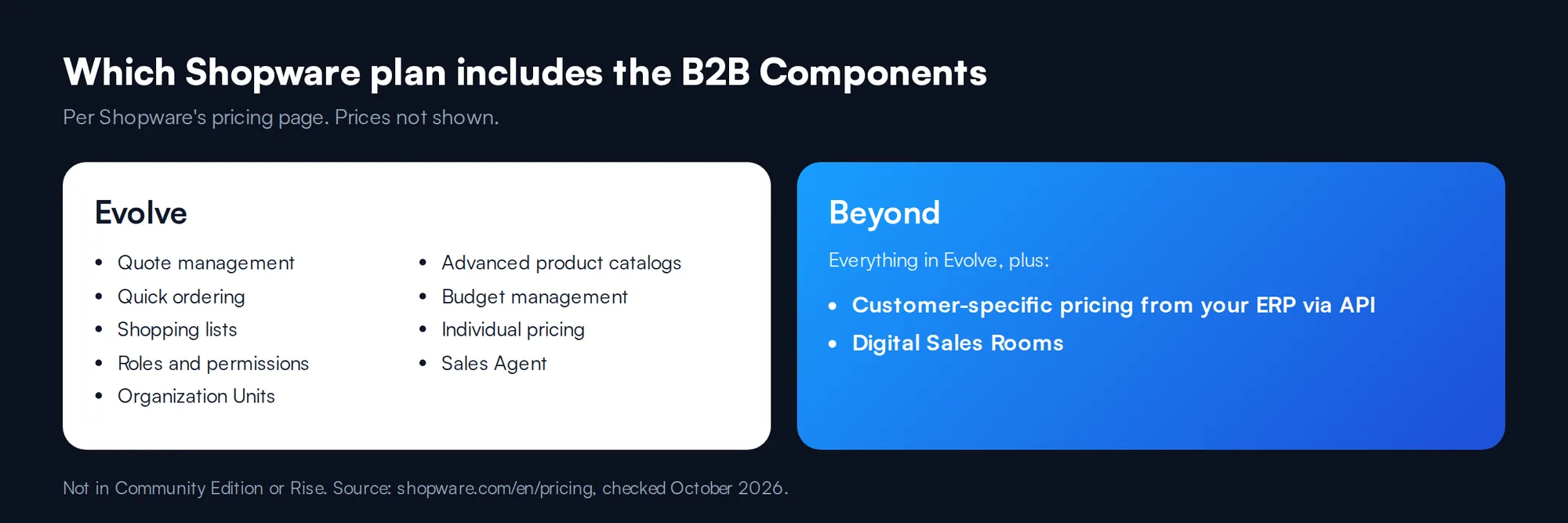
Shopware’s pricing page lists these B2B features by plan.
| Feature | Evolve | Beyond |
|---|---|---|
| Quote management | Yes | Yes |
| Quick ordering, shopping lists | Yes | Yes |
| Enhanced roles and permissions | Yes | Yes |
| B2B Organization Units | Yes | Yes |
| Advanced product catalogs | Yes | Yes |
| Budget management | Yes | Yes |
| Individual pricing (rules) | Yes | Yes |
| Sales Agent | Yes | Yes |
| Customer-specific pricing (from ERP via API) | No | Yes |
| Digital Sales Rooms | No | Yes |
None of these are on the Community Edition or Rise. For the plans themselves, see what Shopware is and our Shopware B2B ecommerce page.
How ERP pricing maps to Shopware
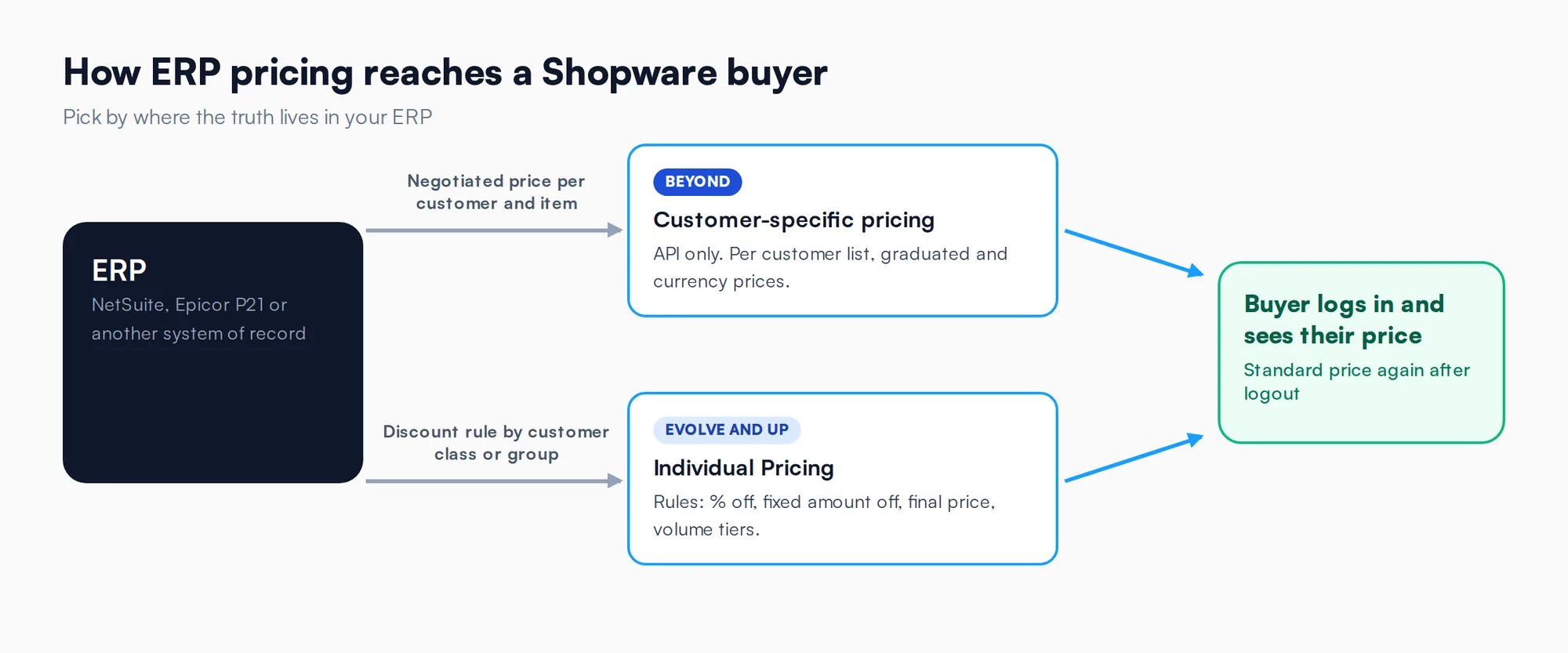
The Suite’s docs cover negotiated prices on offers, but no standing customer prices, so ERP pricing usually ran through a custom plugin. The Components give you two built-in options.
Pick by where the truth lives. If the ERP holds a negotiated number per customer and item, sync it. If it holds a rule, rebuild the rule. See our Epicor P21 integration and NetSuite integration pages for the ERP side, and Shopware Rule Builder pricing for rule design.

Proof: B2B pricing moved onto Shopware 6
Industrial marking products manufacturer
This was not a B2B Suite migration, but it is the same data problem. The manufacturer moved from Shopify to Shopware 6 because its wholesale operations could not run there. One distributor had volume-tiered pricing. Another ordered on net-30 terms with credit limits. A third sent orders through an API. Distributors negotiated pricing by email, and wholesale relationships were managed in spreadsheets.
We migrated customer accounts and order history with validation at every step, and the store went live with wholesale operations intact. Each wholesale customer now has its own pricing, volume tiers and discount structure, and distributors order on the site or by API.
Conclusion
Moving the data is the easy half, because Shopware ships the tool. The work is in custom code, roles, contingents and ERP pricing. Start the inventory on staging now.
Frequently asked questions
It still works, but Shopware says it is no longer being developed and that all new B2B features go into the B2B Components. Shopware’s docs state that the B2B Suite will no longer be supported starting with Shopware 6.8, and ask merchants to plan their migration promptly to avoid disruption.
Not with a new plan. Shopware’s docs say that from May 24, 2025, only the B2B Components are available in the Evolve plan and higher. The Suite installation guide applies only to Evolve plans bought by May 23, 2025. New Shopware B2B builds should start on the Components.
Mostly. The B2B Suite Migration extension moves employees, roles, budgets, quotes and shopping lists in order, and logs errors. You need Suite 4.9.3 or above and a running queue worker. Budgets arrive without an organization unit, and custom plugins and ERP integrations still need rework by hand.
Shopware’s pricing page places quotes, approvals, quick ordering, shopping lists, organization units, budgets and individual pricing on Evolve and Beyond. Customer-specific pricing fed from an ERP, and Digital Sales Rooms, are Beyond only. The Community Edition and Rise do not include the B2B Components.
Yes, on the Beyond plan. Shopware’s customer-specific pricing is managed only through the API, so prices are pushed from the ERP per customer, including graduated and currency prices. On Evolve, Individual Pricing applies rule-based discounts and volume tiers to companies, organization units or customer tags instead.
Still on the Shopware B2B Suite?
We are a Shopware Platinum partner. Send us your Suite setup, plugins and ERP, and we will map what moves, what needs rework and what your pricing should look like on the B2B Components.
Let’s talkSources
- Shopware documentation: B2B-Suite Administration
- Shopware developer documentation: B2B Components
- Shopware developer documentation: B2B Suite Migration
- Shopware: plans and pricing
- Shopware news: B2B Components ready
All sources checked October 2026.
Related guides
Shopware is a trademark of shopware AG. Product names are used to identify the products discussed.